· 9 min read
How Wayboard works: a packing list app built from your trip
A family trip to Lisbon and Porto, made in Wayboard: how the packing list app builds each person's list, from Don't forget to the Final check.
WAYBOARD
How Wayboard works
- When
- From a new trip to the door
- Pack
- A list for each traveler, documents first
Wayboard is a packing list app for iPhone, iPad, Android, and the web. You tell it where you’re going, when, how you travel, and who’s coming. It builds the list from that, with the weather, the entry rules, and each person’s needs, keeps the documents in sight, and ends with a Final check at the door.
The story
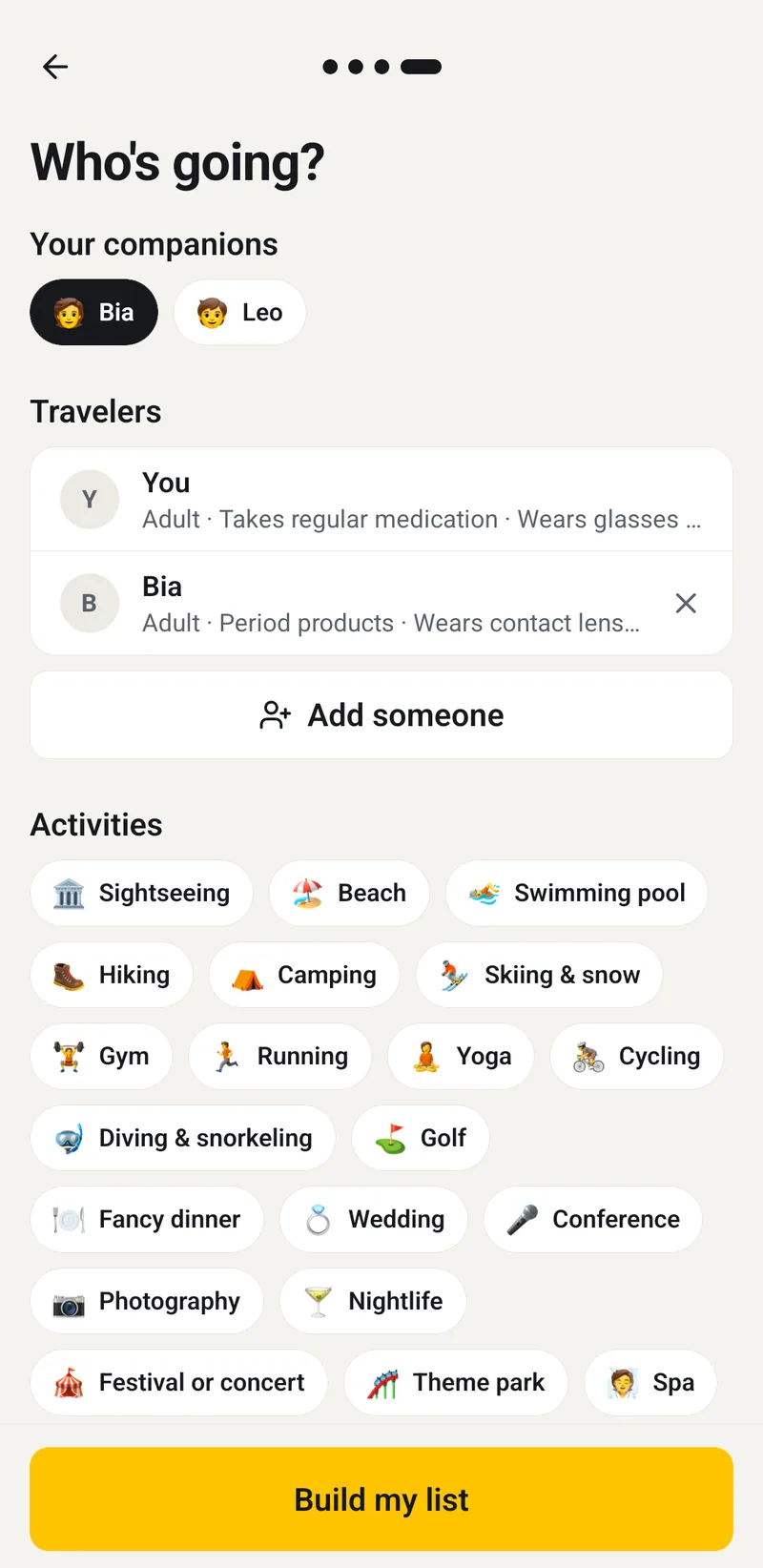
It’s mid-September, three weeks before your family’s week in Portugal, and you open Wayboard on the sofa. Where to? Lisbon, then Porto as a second stop. When? October 8 to 15. What kind of trip? A vacation: the plane to Lisbon, the train to Porto, the plane home; an apartment, then a hotel. Who’s going? Bia and Leo, your partner and your eight-year-old, are saved from your last trip, so each is one tap. You add sightseeing and tap Build my list.
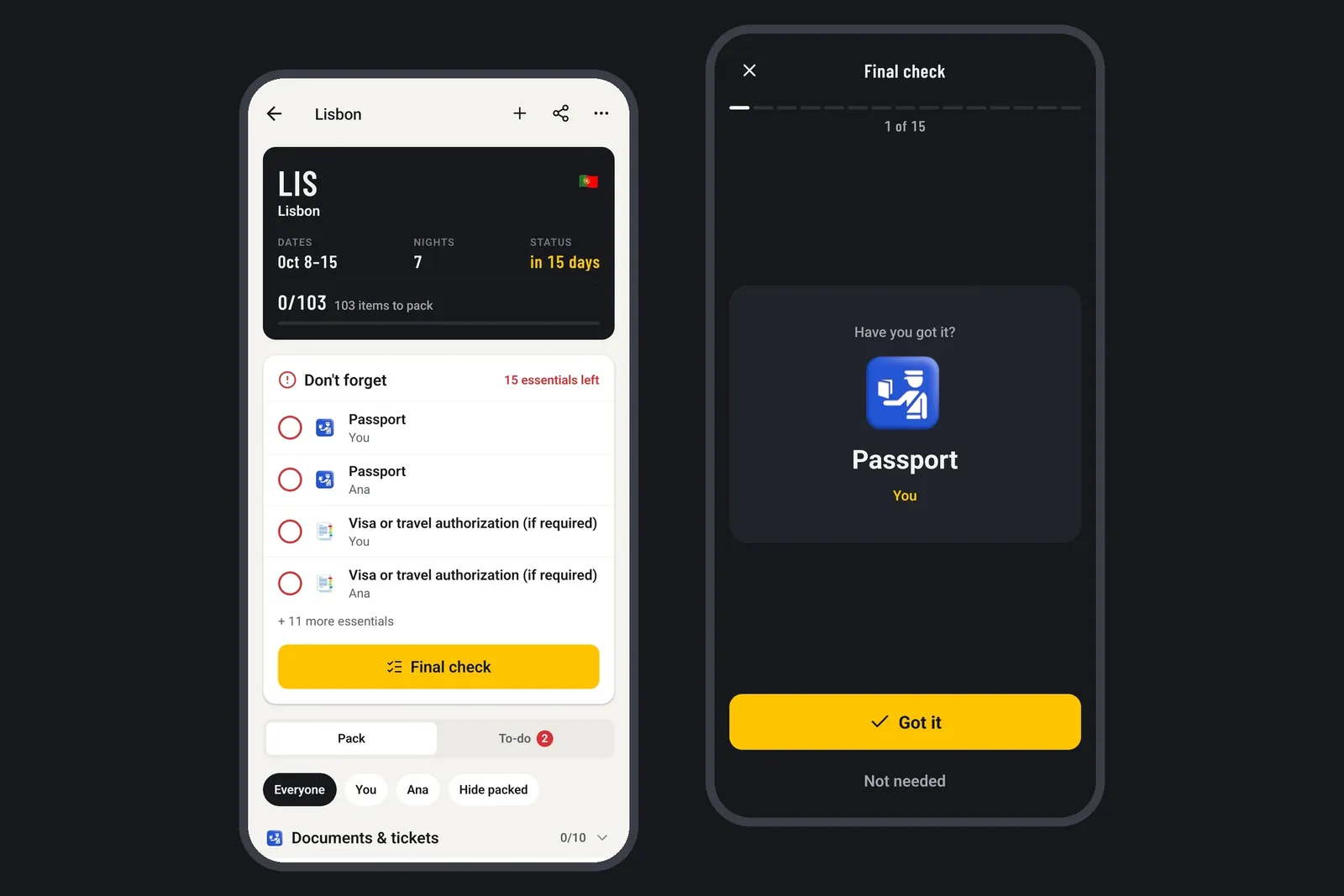
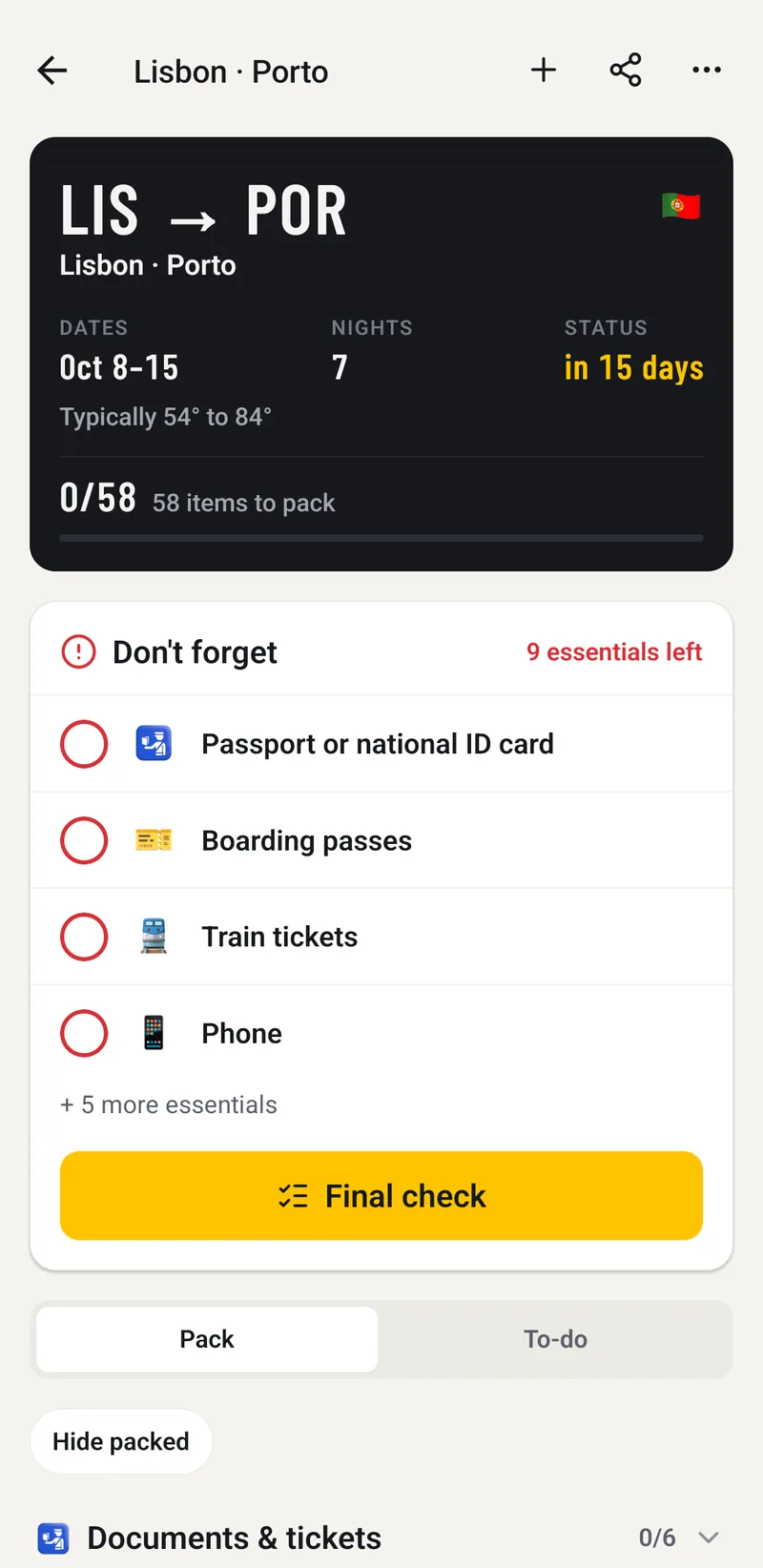
The list appears under a departure board: LIS → POR, October 8–15, 7 nights, in 21 days, with the typical weather for those dates. Documents & tickets come first: three passports, the boarding passes, the train tickets. Leo gets things of his own, like a spare outfit for the carry-on and his comfort toy, and Bia’s contact lenses are there because her profile says she wears them. There’s a travel pillow for each of you, for the long flight; Leo sleeps anywhere, so you swipe his to Not needed. You add his drawing pad yourself, and tick the comfort toy, already in his backpack.
Above the list, the Don’t forget card holds what can’t stay home and isn’t packed yet: the passports, a line for each of you that reads “Visa or travel authorization (if required)”, the tickets, Bia’s lenses, your medication, the house keys. The To-do tab has the jobs, each with its day: check the entry requirements for Portugal; check that the passports, whose dates you never saved, are valid until January 15, 2027, three months after you leave; buy travel insurance; allow extra time for the EU’s biometric check at the border; check in online the day before.
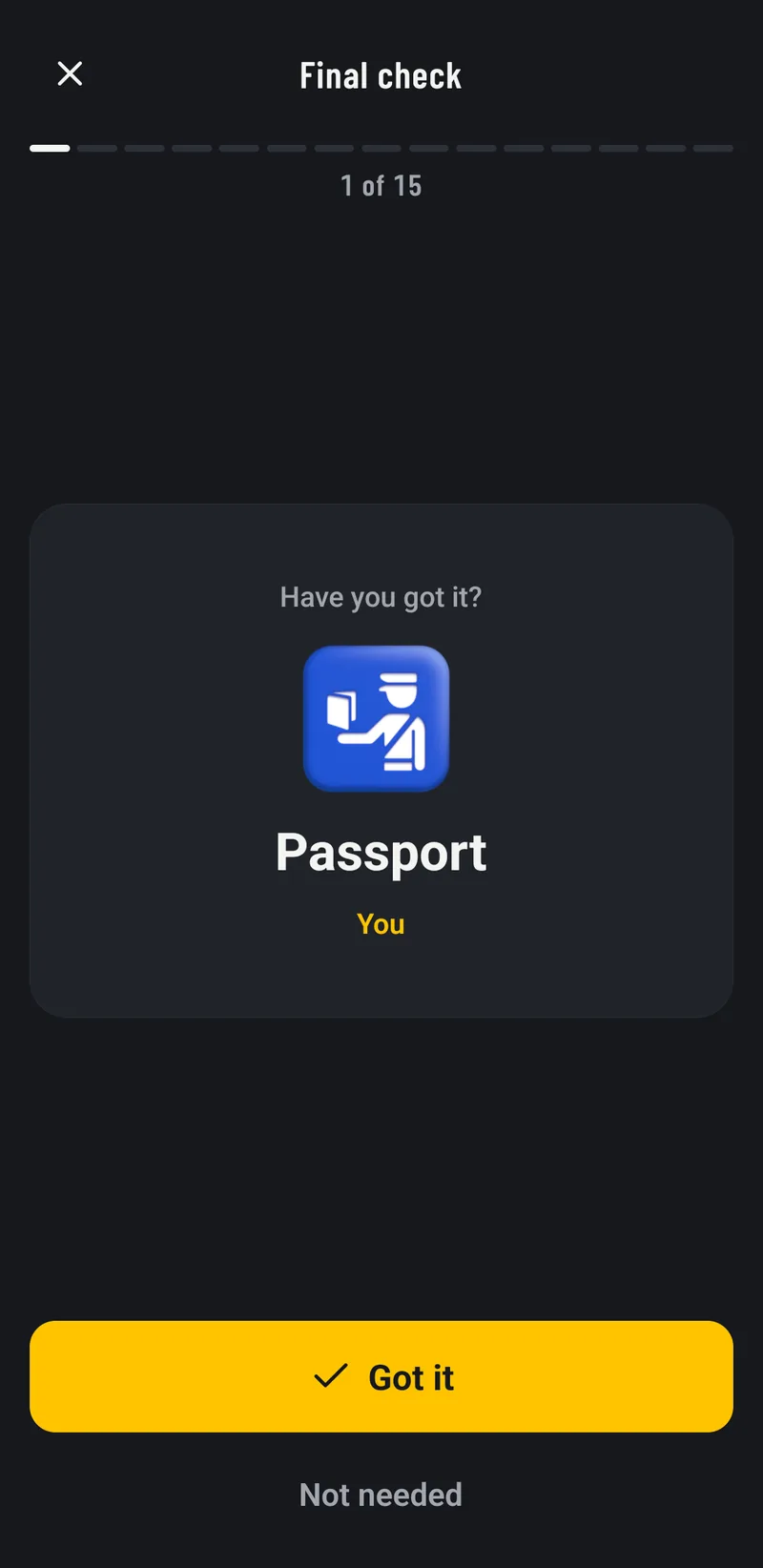
In the week before you leave, the forecast starts replacing the typical weather, day by day, and the list follows it; the comfort toy stays ticked, and the drawing pad stays on the list. The evening before, your phone asks: Leaving tomorrow? At the door, with the taxi waiting, you open the Final check. One essential at a time, it asks, Have you got it?, and you tap Got it: your passport, Bia’s, Leo’s, the phones, the keys, each with a small tick you feel in your hand. After the last card: You’re ready.
On the last evening in Porto, your phone says you’re heading home tomorrow. You tap Pack for the way home: the checks start over for the return, the ones from the way out kept, and the chargers and the comfort toy don’t stay in the hotel room.
Wayboard comes down to three things: the trip builds the list, the essentials stay in sight, and your changes stick. Tell it the trip, keep an eye on Don’t forget, and run the Final check at the door.
How Wayboard works, step by step
Four questions make a trip; the list, the reminders, and the check at the door follow from them.
Your account and profile
- Sign in with Apple, Google, or a code sent to your email, with no password. An account is required: it’s what syncs and backs up your trips.
- Your travel profile, the first time: where you live, which passports you hold, and what you always need, like glasses or regular medication. Where you live tells a domestic trip from an international one, and the passports decide the entry rules. Save your passport’s expiry date too, and Wayboard adds a to-do when it won’t last long enough for a trip.
A new trip in four steps
- Where to? Every stop, in order: the weather, plugs, and entry rules come from here. With no destination, Just make a list still builds one.
- When? The day you leave and the day you get back.
- What kind of trip? Vacation, work, visiting family and friends, or an event; then how you get to each stop and back home, and where you stay. A flight adds boarding passes and a train adds train tickets, as essentials.
- Who’s going? Adults, children, toddlers, babies, and pets, each with their own needs. Then 21 activities, from hiking to a wedding, and two switches: Laundry available, for fewer clothes, and Carry-on only, for the liquids bag and lighter packing.
- Import from a booking fills in the stops and dates from a confirmation email you paste, or from a calendar or email file. It’s read on your phone; only the airport codes are looked up online.
The list
- Documents first, then the rest by section, with quantities that follow the nights, the laundry, and the weather. The list is built on your phone, and the chips above it show everyone, or one person’s part.
- Tap to pack: the item stays where it is, struck through. Swipe for Not needed or Delete, and undo either one. Long-press to change the quantity, the person, the bag, or a note, to mark it Essential, or to see why it was suggested. Add your own items and sections too.
- Change the trip any time: the list follows, and keeps every change you made yourself.
- The weather: for the next nine days, the forecast from MET Norway; further ahead, what the weather did on the same dates in the last two years, from NASA’s POWER project. The board says “Typically…” until the forecast covers the whole trip. The destination’s plugs, voltage, currency, and emergency number are at the bottom of the list.
Don’t forget and the to-dos
- Don’t forget is pinned above the list, with the essentials still missing: passports or ID, a visa or travel authorization where one may be required, tickets, wallets, phones, keys, and medication.
- Entry rules for 121 countries: passport validity, travel authorizations such as the ESTA for the United States or the UK’s ETA, and the places where an ID card is enough, like the EU or Mercosur. Wayboard doesn’t decide whether you need a visa: it tells you what to check and links to the official sites. For a first trip abroad, what to pack for your first international trip goes through these checks.
- To-do holds the jobs before you go, each with its day: apply for a travel authorization, buy travel insurance, check in online, lock the doors. Some, like travel insurance or an eSIM, suggest a few companies; when one pays Wayboard a commission, the app says so, your price is the same, and Premium turns them off.
- Reminders on your phone, which you can turn off: start packing two days before, the Final check the evening before, each to-do on its day, and packing for home before you return.
The people going
- Adding someone to a trip is free, with their needs: glasses, contact lenses, period products, a CPAP machine, or hearing aids. A baby gets diapers, wipes, and a changing mat, as in what to pack when flying with a baby.
- With Premium, travel companions are saved once, with what they always need, and join any trip in one tap. You can also pack a trip together: each person packs their part of the same list on their own phone, and what anyone ticks shows up for everyone. Premium holds up to 3 people on a trip, and Premium Family up to 6.
At the door, and after
- Final check goes through the essentials one at a time: Have you got it? Got it packs it, Not needed sets it aside, and one step back fixes a wrong tap.
- Pack for the way home starts the checks over for the return, keeping the ones from the way out.
- Bags keep a list of what’s in each one, to share if a bag goes missing.
- Duplicate trip, Save as list template, and Export PDF take the trip further: new dates, a list to reuse, or the itinerary, the destination’s facts, the to-dos, and the list on paper.
Good to know
- Free and Premium: free covers as many trips as you like, with their lists, Don’t forget, the Final check, sync, backup, export, and two reusable lists. Premium adds travel companions, packing a trip together, unlimited reusable lists, and turning off partner suggestions; it’s monthly or yearly, bought in the app through the App Store or Google Play. Widgets, a document vault, and bookings forwarded by email are coming to it.
- Where it works: iPhone, iPad, Android, and the web at wayboard.app, with the same account.
- Other apps: Wayboard side by side with PackPoint, Packr and others, from their own store pages: packing list apps compared.
- Offline: lists live on your phone first, so you can check things off with no signal; changes sync when you’re back online. Finding places and the weather needs a connection.
- Privacy: synced trips are encrypted on Wayboard’s servers, each with its own key, and the apps have no ad networks or trackers. Export everything, or delete your account, from the app at any time.
- Languages: the apps are in English, with American or British spelling, and Portuguese (Brazil); Spanish comes next.
- Where the facts come from: the weather from MET Norway and NASA POWER, places from GeoNames, and plugs, voltage, currency, and entry rules gathered for 121 countries; other destinations get the list without those facts. About Wayboard has the details.
Questions
Is Wayboard free?
Yes: trips, their lists, Don’t forget, the Final check, sync, backup, and export are free, for as many trips as you like. Premium adds travel companions, packing a trip together, unlimited reusable lists, and turning off partner suggestions.
Does Wayboard work offline?
Yes: your lists live on your phone first, so you can check things off with no signal, at the gate or on the plane. Changes sync when you’re back online; finding places and the weather needs a connection.
Do I need an account to use Wayboard?
Yes: you sign in with Apple, Google, or a code sent to your email, with no password. The account is what syncs and backs up your trips between your phone and the web.
Does Wayboard know visa and entry rules?
Entry rules, yes, for 121 countries: passport validity, travel authorizations such as the ESTA, and where an ID card is enough. For visas, it tells you what to check and links to the official sites.
How is Wayboard different from PackPoint?
Both build a list from your trip. Wayboard also takes a transport and a stay for each stop, reads the entry rules for 121 countries, gives each traveler their own needs, and ends with a Final check at the door and packing for the way home.